Advanced Text and Logo Overlay Studio
Professional video text editing with cutting-edge typography. Add address text, price callouts, and your own logo to any listing video — and watch every change in a live preview before you export.
Live preview, reusable presets, and your logo on every frame.
Everything in One Panel, With a Live Preview
Style on the left, see the result on the right. No render-and-check loop, no guessing whether your text lands over a window or a tree.
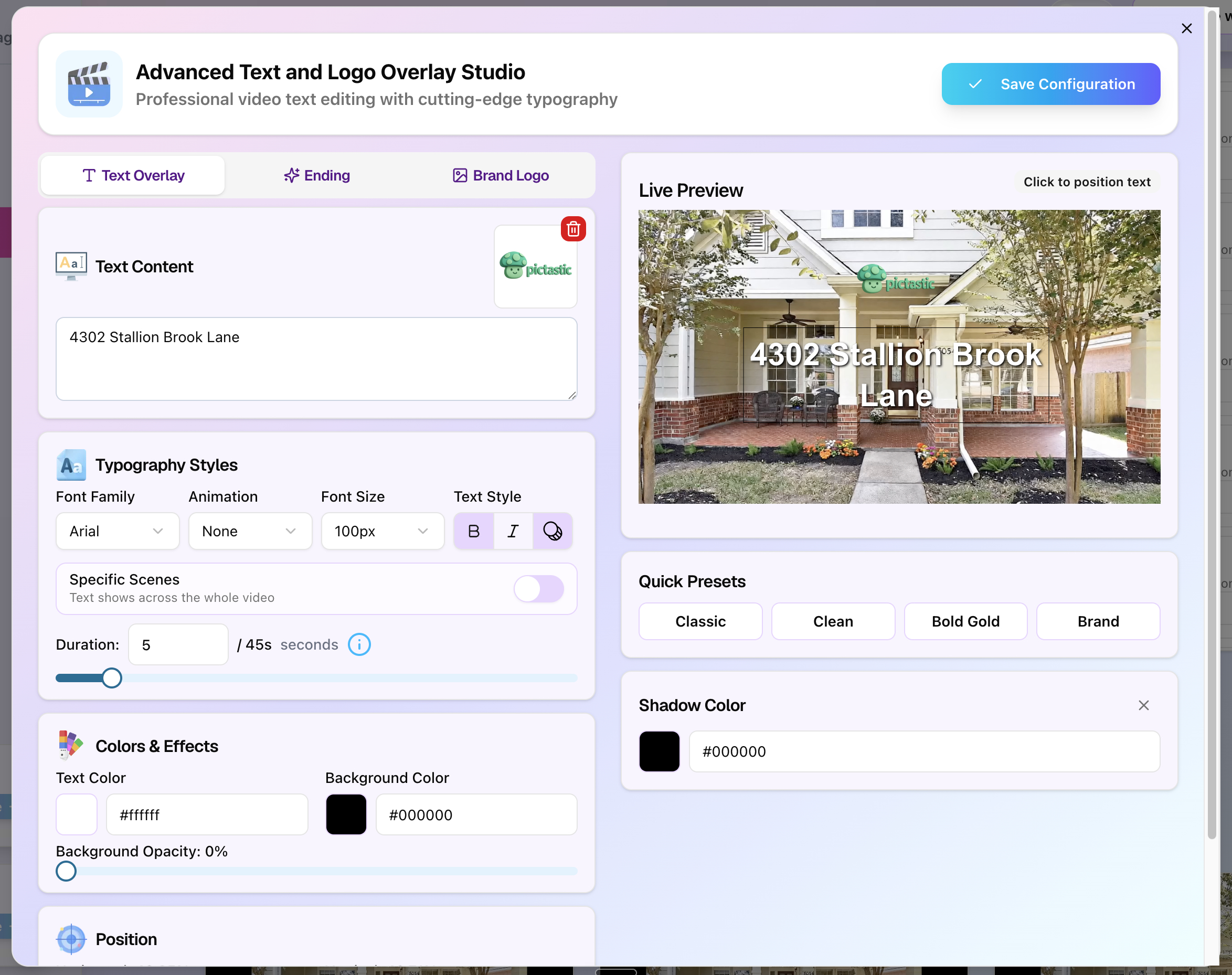
Live preview
Every tweak renders instantly on your real footage.
Click to position text
Tap the preview to place text exactly.
Quick presets
Classic, Clean, Bold Gold, and Brand in one click.
Studio-Grade Controls, Not a Caption Box
Most tools give you one font and one position. This gives you the controls a designer would expect.
Typography styles
Pick your font family, set the exact font size, and toggle bold, italic, or an outlined stroke so text stays readable over any photo.
Colors & effects
Set text color, background color, and background opacity independently — plus a shadow color that lifts light text off bright exteriors.
Click-to-place position
Click anywhere on the live preview to drop your text exactly where you want it. No guessing at coordinates or percentages.
Timing & specific scenes
Show text across the whole video or limit it to specific scenes, then dial in the duration in seconds with a simple slider.
Entrance animation
Add a motion style so your address or price animates in cleanly instead of appearing as a flat, static caption.
Brand logo overlay
Upload your logo once and it rides along on every video as a persistent watermark, positioned wherever you want it.
Three Layers of Branding
The studio is organized into three tabs, so each part of your video's branding has a home.
Address, price, and feature callouts
Type any text — a street address, an asking price, an open house time, or a feature like "Chef's Kitchen" — then style it with full typography and color control. Watch every change land in the live preview instantly.
- Any text content you want
- Full typography control
- Per-scene or whole-video display
A closing card that drives the next step
Finish every video with a consistent outro — your name, your brokerage, a phone number, or a call to action. Set it once so every listing video ends on-brand instead of cutting off abruptly.
- Consistent closing card
- Your contact details
- Reusable across listings
Your logo on every single frame
Drop in your brokerage or personal logo and it's baked into the video as a clean watermark. Every video that leaves your account is unmistakably yours, whether you post it or hand it to a client.
- Upload once, reuse forever
- Position it anywhere
- Subtle or prominent
Start From a Preset, Then Make It Yours
Four one-click starting points handle the styling decisions for you.
Classic
White text with a soft drop shadow — the safe, readable default for any exterior shot.
Clean
Minimal, lighter weight type with no background bar for a modern, understated look.
Bold Gold
Heavy gold type that reads as premium — built for luxury and high-end listings.
Brand
Pulls your saved brand colors so every video matches your existing marketing.
How It Works
From finished video to fully branded deliverable in four steps.
Generate your video
Upload listing photos and let PhotoAIVideo build the cinematic walkthrough first. The overlay studio works on the finished video.
Open the overlay studio
Switch between the Text Overlay, Ending, and Brand Logo tabs to layer on everything your video needs.
Style it in the live preview
Adjust typography, colors, shadow, position, and duration while watching the preview update in real time.
Save your configuration
Hit Save Configuration and your setup becomes a reusable preset — the next listing takes seconds, not minutes.
What Agents Actually Use It For
Address overlays
Burn the street address into the opening seconds so viewers immediately know which property they're looking at.
Brokerage branding
Keep your brokerage logo on every frame so shared videos market your business, not a software company's.
Feature callouts
Label specific scenes — primary suite, backyard, renovated kitchen — timed to appear only while that footage plays.
Client-ready deliverables
Photographers can overlay each client's own logo, delivering fully branded videos as a paid add-on service.
See How PhotoAIVideo Works
Watch this quick walkthrough to see how you go from listing photos to a polished, professional video in under three minutes — no editing skills needed.
Full platform walkthrough · 3 minutes · No editing experience required
Before and After: Static Photos to Cinematic Video
These are real listing photos transformed by PhotoAIVideo into full cinematic walkthroughs. Same photos your clients are already providing — dramatically better output.
Before — Static Listing Photo

A standard MLS listing photo — high quality, but completely static. No motion, no engagement, no differentiation.
After — AI-Generated Cinematic Video
The same property — now a scroll-stopping cinematic walkthrough. Generated from photos in under 3 minutes.
Before — Static Listing Photo

A standard MLS listing photo — high quality, but completely static. No motion, no engagement, no differentiation.
After — AI-Generated Cinematic Video
The same property — now a scroll-stopping cinematic walkthrough. Generated from photos in under 3 minutes.
Ready to create videos like these for your own listings?
Why Text and Logo Overlays Matter on Listing Videos
A listing video without an address is a beautiful clip that nobody can act on. Someone scrolling past your reel has a few seconds to decide whether the property is relevant to them, and the fastest way to answer that is text on screen. An address in the opening seconds, a price, or an open house time turns a pretty video into a piece of marketing that actually generates calls.
Branding matters just as much. When a video gets shared, forwarded, or reposted, the logo on the frame is what travels with it. If your brokerage mark is baked in, every share is working for you. If there's no logo at all, the work still gets seen but nobody knows who produced it — and if a third-party tool stamps its own watermark on your video, you're marketing someone else's software for free.
The reason most agents skip overlays isn't that they don't understand the value. It's that traditional editors make it tedious. You add a text layer, guess at the position, render, discover the caption is sitting on top of a tree, and start over. That loop is why so many listing videos go out plain. A live preview removes it entirely: you click where the text should sit, adjust the size and shadow until it reads cleanly, and you're done.
Reusability is the other half. Once you've decided how your videos should look — your font, your colors, your logo in the corner — you shouldn't rebuild that on every listing. Saving a configuration means the tenth video takes seconds and looks identical to the first. That consistency is what makes a feed look like a brand instead of a folder of one-off uploads. Combine it with automatic AI voiceovers and an AI avatar clone and a single set of listing photos becomes a fully produced, fully branded video.
Frequently Asked Questions
Put Your Address and Logo on Every Video
Create a free account, generate your first listing video, and brand it in the overlay studio in minutes.