The Real Estate Video API That Turns Property Photos Into Cinematic Reels
One POST request turns a listing photo into a cinematic video clip. One more merges those clips into a branded reel with music, address text, an ending card, and your logo. Build it into your own app or bolt it onto the platform you already run.
Activate a plan, generate a key, and make your first call in under ten minutes.
Everything You Need Ships With the Key
The developer dashboard is where you activate API access, mint keys, and watch what your integration is doing. No sales call, no waitlist, no manual provisioning step between you and your first request.
- Pick a plan under Plan & Billing to switch API access on instantly
- Create and revoke keys from the API Keys tab whenever you need to
- Watch requests, jobs, and failures in the Usage & Logs tab
- Track credits from the Overview tab or the credits endpoint
Basic Photos Into Moving Videos
This is what a single API call returns. Send one still listing photo, get back a cinematic clip — the same transformation your users see in the app, now available to everything you build.
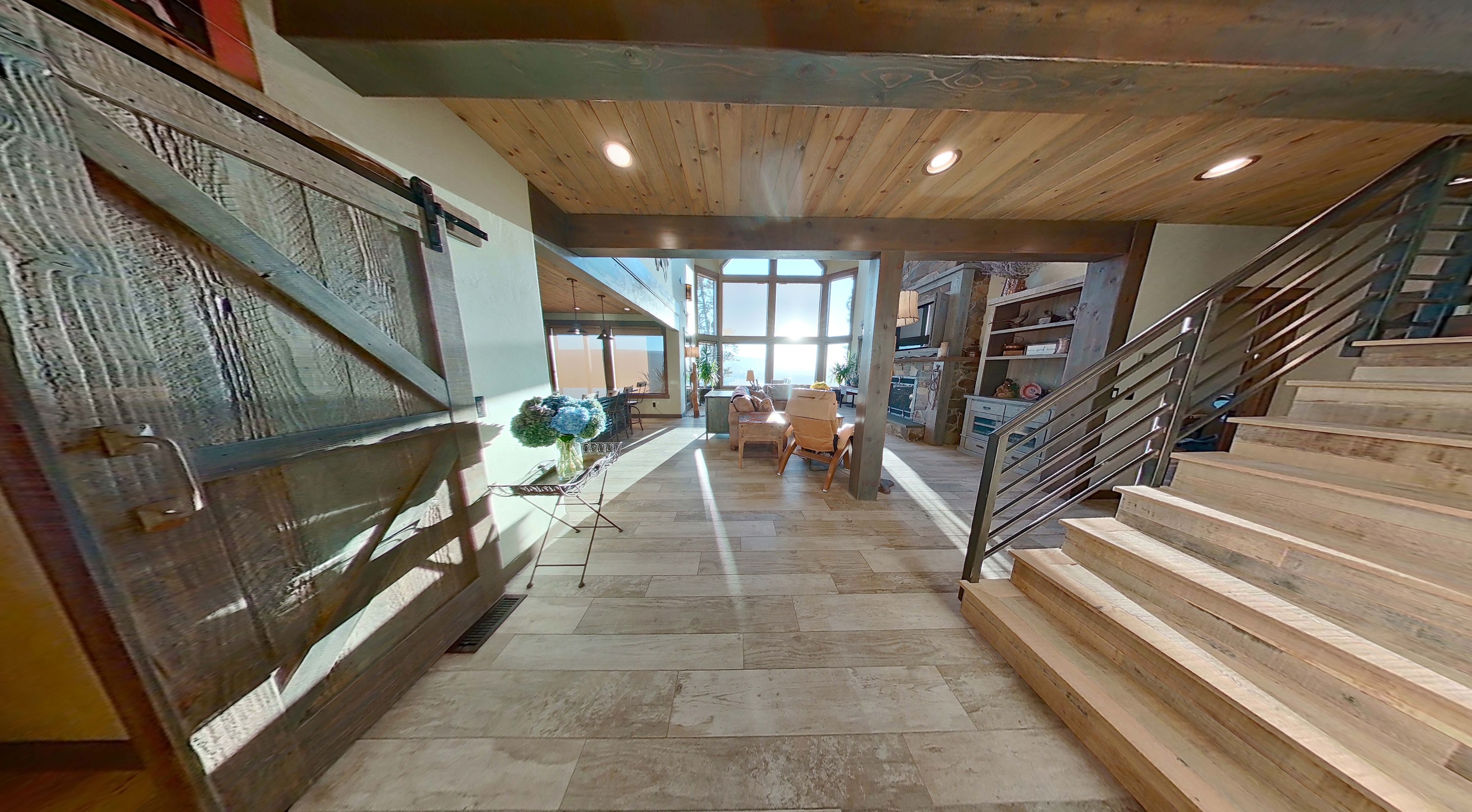
BEFORE: STATIC PHOTO
AFTER: CINEMATIC VIDEO
Every Feature in the App, Available Through the API
Making reels, camera moves, music, overlays, ending cards, and logo watermarks are not bolt-ons — they are the same capabilities that power PhotoAIVideo, exposed as endpoints you can call from anywhere.
Photo-to-video clips
Turn any single listing photo into a cinematic clip with real camera motion — the same engine behind the app, exposed as one POST request.
Merge into branded reels
Stitch 2–20 clips into one walkthrough reel per property, in the exact room order you choose, in a single call.
Background music
Score every reel with no_music, tropical, lofi, or jazz, with automatic per-clip fade in and out.
Address & price overlays
Burn in address text, price callouts, and calls to action with full control over font, size, color, and placement.
Ending cards
Close every reel with a branded card — your message, your colors, an optional background image, timed 1–10 seconds.
Logo watermarks
Overlay your own or your client's PNG logo across the whole video so the finished file ships fully white-labeled.
19 camera movements
Push-ins, orbits, crane moves, aerials, and more — pass any combination to control how the camera travels the shot.
Vertical social reels
Request portrait 1080x1920 output ready for Instagram Reels, TikTok, and YouTube Shorts straight from the API.
Build Your Own App, or Add AI Video to the One You Have
The hard parts of AI video — the model, the render farm, the music mixing, the overlay compositing, the file hosting — already exist behind these endpoints. You supply photos and prompts.
Add it to an existing platform
Already run a CRM, MLS tool, listing portal, or property management app? Drop the API behind a single button so every listing in your database can generate a cinematic video without your users ever leaving your product.
Build your own video app
Ship a standalone AI video product without training a model or building a render pipeline. You send photos and prompts, we handle generation, merging, music, overlays, and hosting of the finished MP4.
Automate a service business
Photographers, agencies, and marketing teams can wire the API into their existing workflows so every shoot automatically produces a reel for the client, batched overnight and delivered in the morning.
What Developers Build With It
Bulk listing video generation
Loop your photo library through the videos endpoint and produce a clip per room, then merge them into one walkthrough reel per property.
Automated listing pipelines
Trigger a video job the moment a new listing hits your database, poll for completion in a background worker, and push the finished URL to your listing page.
Social-first vertical reels
Request portrait orientation for 1080x1920 output ready for Instagram Reels, TikTok, and YouTube Shorts, complete with music and an ending card.
Branded client deliverables
Burn address text, price callouts, and your client's logo into every reel so the output ships fully branded straight out of the API.
How to Set Up the API in Six Steps
Every endpoint lives under one base URL and returns JSON. Here is the complete path from an empty project to a finished branded reel.
Create your API key
Open the API dashboard, choose a plan to activate API access, then generate a key from the API Keys tab. Send it on every request as either an Authorization: Bearer header or an x-api-key header. Keys are scoped to your account, credits are shared across all of them, and a revoked key returns 401 immediately.
Authorization: Bearer <API_KEY>
# or
x-api-key: <API_KEY>Get a presigned upload URL
All input images must live on our storage — external image URLs are rejected. Call the presigned URL endpoint to reserve upload slots for 1 to 20 images. This endpoint is completely free and never costs a credit.
GET /api/v1/presigned-urls?count=1

{
  "bucket": "api-uploads",
  "uploads": [
    {
      "path": "<keyId>/<uuid>",
      "token": "...",
      "presignedUrl": "https://...",
      "publicUrl": "https://..."
    }
  ]
}Upload the property photo
PUT the raw image bytes to the presignedUrl with a Content-Type of image/jpeg or image/png. Hold on to the matching publicUrl — that is the value you pass as imageUrl in the next step.
curl -X PUT "<presignedUrl>" \
  -H "Content-Type: image/jpeg" \
--data-binary @photo.jpgCreate the video job
POST a prompt plus your uploaded imageUrl. Optionally add an endImageUrl for the last frame, a list of camera effects, and a duration of 4, 5, or 6 seconds. The call is asynchronous: it charges 1 credit upfront and returns a jobId right away.
POST /api/v1/videos

{
  "prompt": "smooth cinematic reveal of a modern living room",
  "imageUrl": "<publicUrl>",
  "effects": ["push_in", "pan_left"],
  "duration": 5
}

{ "jobId": "uuid", "status": "pending", "creditsCharged": 1 }Poll until the clip is ready
Check the job every few seconds until status flips to completed or failed. A finished job returns video_url for inline playback and download_url for a forced download. If generation fails, the credit is refunded to your account automatically.
GET /api/v1/videos/:jobId

{
  "job": {
    "status": "completed",
    "video_url": "https://...",
    "download_url": "https://...?download",
    "credit_cost": 1
  }
}Merge clips into a branded reel
Pass 2 to 20 completed job IDs in the order you want them to play. Layer on background music, a text overlay, an ending card, and a watermark logo. This also costs 1 credit and returns a jobId you poll the same way.
POST /api/v1/reels

{
  "videoJobIds": ["uuid-1", "uuid-2"],
  "orientation": "portrait",
  "musicType": "lofi",
  "textOverlay": { "text": "123 Main Street, Miami", "fontSize": 56 },
  "ending": { "text": "Contact us today!", "duration": 3 },
  "logo": { "url": "<logoPublicUrl>", "scale": 15 }
}
The full request and response schema for every field, including the exact base URL, lives in the API documentation. Grab a key from the API dashboard and you can paste these calls straight into your terminal.
The Whole API Is Eight Endpoints
Two of them cost a credit. The other six are free, so status polling and usage checks never eat into your plan.
/api/v1/presigned-urlsFreeReserve 1–20 signed upload URLs for your input images./api/v1/videos1 creditTurn one property photo into a cinematic video clip./api/v1/videos/:jobIdFreeCheck status and fetch the finished video and download URLs./api/v1/videosFreeList this key's video jobs, newest first, with limit and offset./api/v1/reels1 creditMerge 2–20 completed clips into one branded reel./api/v1/reels/:jobIdFreeCheck reel status and fetch the merged output video./api/v1/reelsFreeList this key's reel jobs, newest first, with limit and offset./api/v1/creditsFreeRead total, used, and remaining credits on the account.Nineteen Camera Moves, Three Durations
Pass any combination of effect codes in the effects array to control how the camera travels through the still photo. Clip duration is 4, 5, or 6 seconds.
dolly_zoompull_outpush_inaerial_dronelow_anglehigh_angleaerialzoom_inzoom_outtruck_lefttruck_rightpedestal_downpedestal_upcrane_downcrane_uppan_leftpan_rightorbit_leftorbit_rightThe Reel Endpoint Does Your Post-Production
Merging is not just concatenation. One call handles music, typography, a closing card, and a watermark, so the file that comes back is already client-ready.
Background music
Choose no_music, tropical, lofi, or jazz. Per-clip fade in and out is on by default and can be switched off with isFadingEnable.
Text overlay
Set the text, font family, size from 12–200px, color, background color and opacity, bold and italic, percentage-based position, and how many seconds it stays on screen.
Ending card
Append a closing message after the last clip with its own font size, colors, optional background image, and a duration of 1–10 seconds.
Brand logo watermark
Overlay a PNG logo across the whole video with control over position, scale from 5–40% of frame width, and opacity.
Credits and Authentication, Explained
How credits work
- 1 video generation = 1 credit. 1 reel merge = 1 credit.
- Credits live on the account and are shared across every key.
- Charged upfront when a job is accepted.
- Refunded automatically if generation fails.
- Check the balance any time with GET /api/v1/credits.
How keys behave
- Send Authorization: Bearer or x-api-key — both work.
- Missing, invalid, or revoked key returns 401.
- Valid key without API access enabled returns 403.
- Valid key with no credits left returns 402.
- A key can only read the jobs it created.
Error reference
400Validation failed — the message lists the allowed values for the field you got wrong.401Invalid or missing API key, including keys you have revoked.402Not enough credits. The response includes required and remaining counts.403The key is valid but API access is not enabled for the account yet.404Resource not found, which also covers jobs that are not owned by this key.500Internal server error.API Pricing
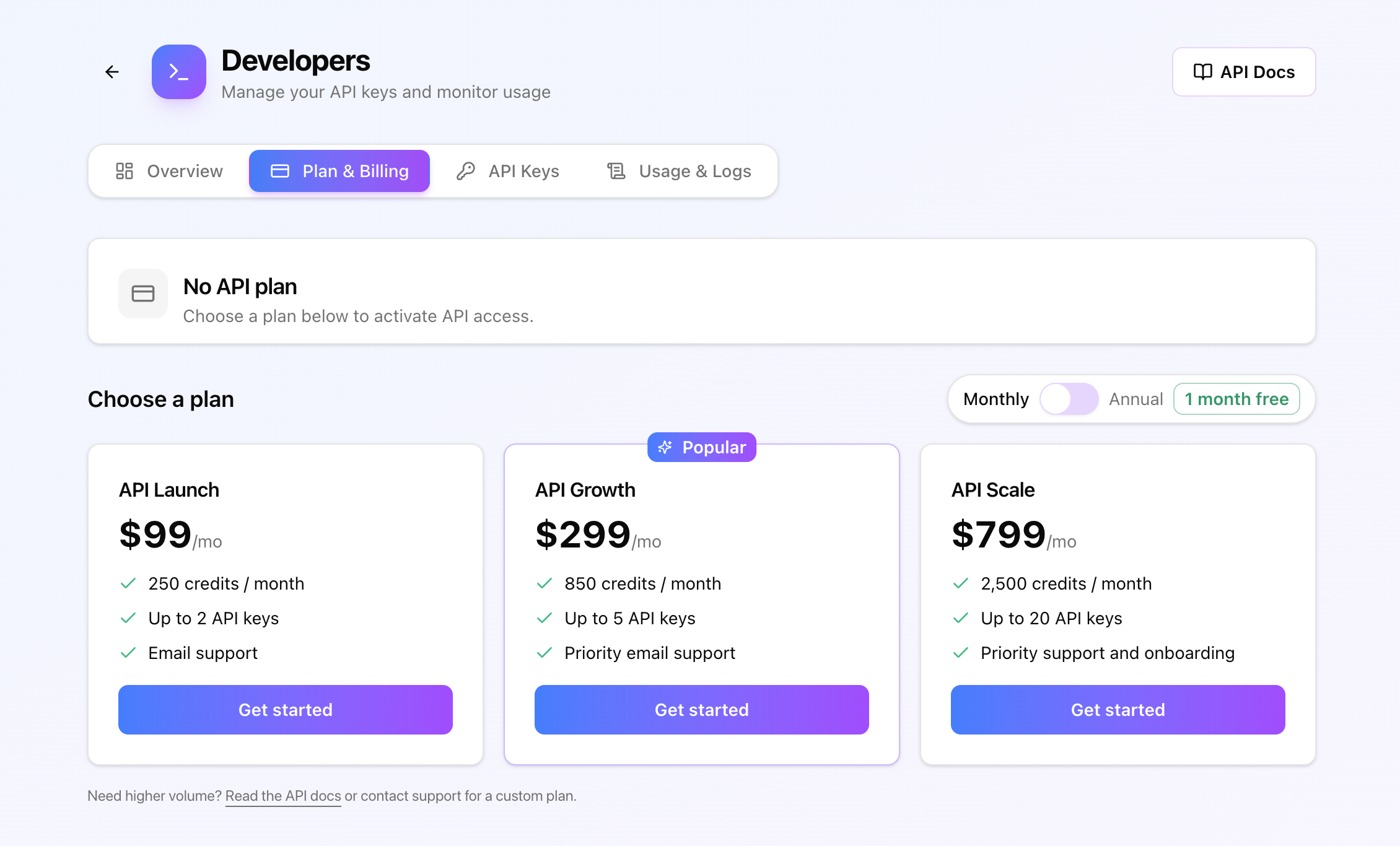
Choose a plan in the dashboard to activate API access. Start on the weekly plan for $20, or switch to annual billing on any tier and one month is free.
API Starter
Billed weekly- 45 credits per week
- Up to 1 API key
- Email support
API Launch
- ≈ $91/month, billed annually
- 250 credits / month
- Up to 2 API keys
- Email support
API Growth
- ≈ $274/month, billed annually
- 850 credits / month
- Up to 5 API keys
- Priority email support
API Scale
- ≈ $732/month, billed annually
- 2,500 credits / month
- Up to 20 API keys
- Priority support and onboarding
Need higher volume? Read the API docs or contact support for a custom plan.
Why Build on a Real Estate Video API Instead of Rolling Your Own
Video is the format that moves listings, and everyone in property knows it. The problem has never been demand — it has been unit economics. A videographer costs hundreds of dollars per property and takes days to turn around. That math works for a luxury listing and collapses for everything else, which is why the overwhelming majority of listings still ship as a photo carousel. An AI video generation API changes the cost per listing from hundreds of dollars to a single credit, which is what makes video viable at portfolio scale.
Building that capability yourself is a much bigger project than it first appears. You need a video-generation model and the GPU capacity to serve it, a job queue that survives long renders, an FFmpeg pipeline for merging clips and mixing music, a compositing layer for text overlays and logo watermarks, storage and a CDN for the finished MP4s, and a billing system that refunds work that failed halfway through. Each of those is weeks of engineering and an ongoing operational burden. The overlay and branding layer alone is a product in its own right.
A photo to video API collapses all of that into two paid endpoints. You POST a prompt and an image URL, you poll a job, and you get back a hosted MP4 with a playback URL and a download URL. Merging is one more call that accepts up to twenty completed clips in whatever order you specify, along with background music, address text, a closing card, and a logo. The asynchronous job model matters more than it sounds: because nothing blocks on an open HTTP connection, you can fan out hundreds of jobs from a background worker and collect results as they land, instead of babysitting long-running requests.
The credit model is deliberately simple so you can build pricing on top of it. One video is one credit, one reel merge is one credit, and everything else — uploads, status polls, job lists, balance checks — is free. Credits are charged when a job is accepted and refunded automatically when a render fails, so a bad generation never shows up on your bill. Because credits sit on the account rather than the key, you can issue a separate key per environment or per client and still draw from a single balance, which makes multi-tenant integrations straightforward.
For anyone reselling video, the branding controls are the important part. Every reel can carry your own logo, your own typography, and your own call to action, so the output looks like it came from your product rather than ours. Combined with AI avatar presenters and automatic voiceovers, you can assemble a complete white-labeled listing marketing product on top of infrastructure you did not have to build. Read the API documentation to see the full schema, then activate a key and ship your first request today.
API Questions, Answered
Ship Your First AI Property Video Today
Activate a plan, generate a key, and POST your first job. The docs have every field, every error code, and a copy-paste end-to-end example.